Studios and editors — maybe you don't need them anymore.
Image generation used to just "draw what it was told." In April 2026, it finally entered the "think first, then create" era. What ChatGPT Images 2.0 (gpt-image-2) brought with it is a quiet little revolution — one that matters most to small shops and small businesses.
"Drawing" vs "Thinking, Then Creating" — What's the Difference?
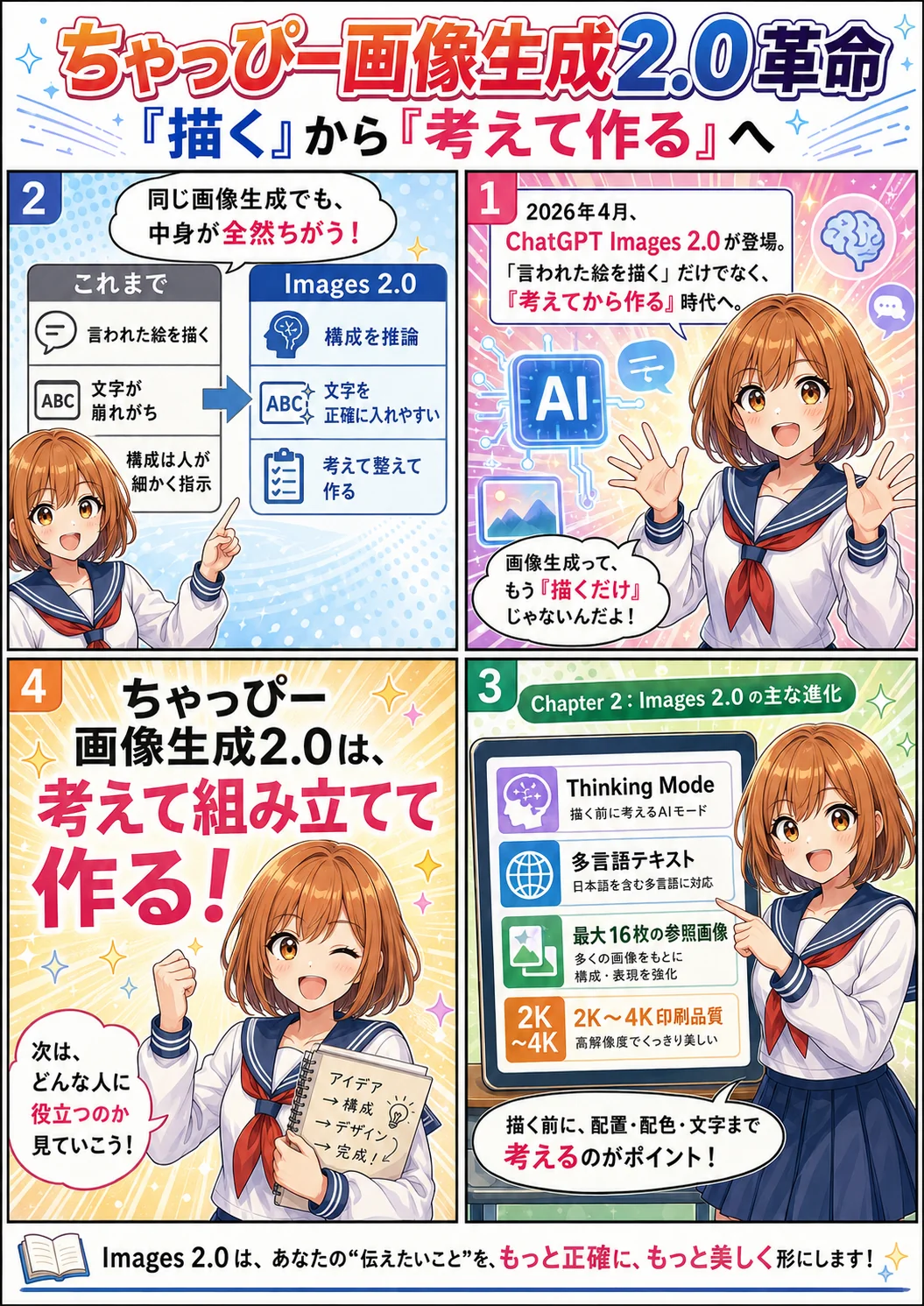
It's all called "image generation," but what comes back is completely different. Before: it just turned your words into a picture. Now: it thinks, composes, and even gets the text right.
🖼 Draws what it's told
- You say "draw me an X" and it outputs exactly that, as-is
- Text comes out garbled, with constant spelling errors
- Layout and composition have to be spelled out by a human
- Fixing anything means starting over with a new prompt
🧠 Thinks, composes, then creates
- Before drawing, it reasons about structure, layout, and readability
- Renders text in Japanese and English accurately
- Takes up to 16 reference images into context at once
- 2K–4K resolution — quality you can send straight to print
"Chappy's Image Gen 2.0" — What's Actually New?
On April 21, 2026, OpenAI overhauled its image generation model. Product name: ChatGPT Images 2.0. API model ID: gpt-image-2. Its headline feature is what OpenAI calls "Thinking Mode" (think before you draw) — image generation with reasoning built in.

Chappy
Until now, image generation was just converting text into pictures. Ask for "a menu" and you got something plausible-looking with unreadable text and a layout that fell apart. Chappy's Image Gen 2.0 is designed to reason about structure, layout, text content, and consistency before it starts drawing. When needed, it goes out and does a web search for reference material, then checks its own output and redraws — that's the revolution.
Given a prompt, it reasons out the layout, color scheme, element placement, and even the text first. Even with vague instructions, it builds a structure, thinks it through, and delivers one finished piece.
Renders multilingual text — including Japanese, Chinese, and Korean — almost flawlessly. For text-heavy jobs like menus, flyers, and signage, it's in a league of its own.
Food photos from your phone, shots of your shop interior, a hand-drawn sketch — you can hand over up to 16 images at once. It understands the whole context and turns it into one polished deliverable.
Choose from 1K / 2K / 4K resolution. 2K works for flyers and in-store POP displays; 4K for posters and signs — usable directly. It also took the #1 spot on the Image Arena leaderboard (by a +242 point margin) for image quality.
Built for People Running a Small Business
Where Chappy's Image Gen 2.0 truly shines is in the places that always had to compromise for lack of budget and time. Welcome to a world where you skip the agency, do it alone, and finish today.
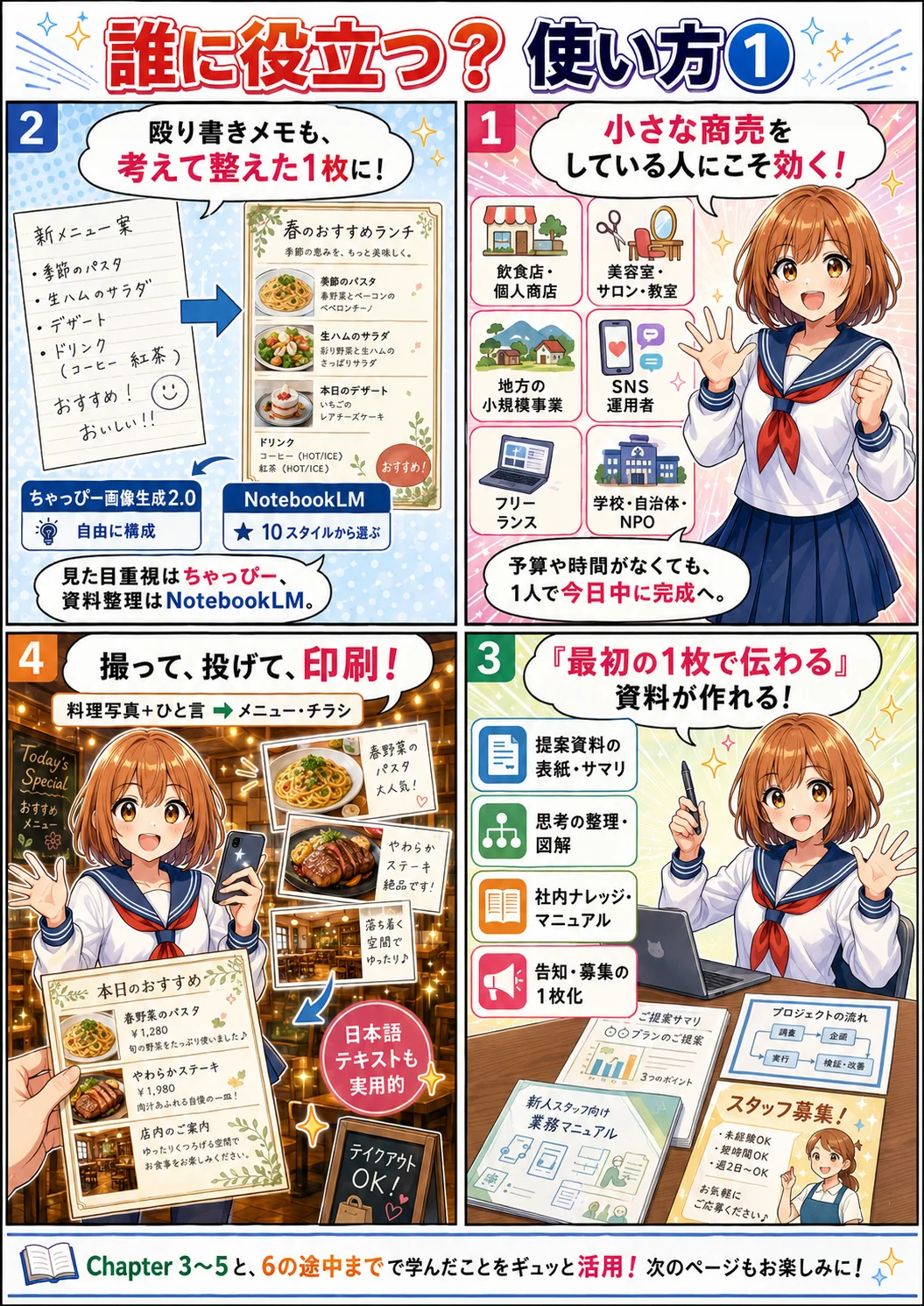
Restaurants & local shops
Toss in food photos from your phone and say "turn this into a menu." Out comes a single sheet with dish names, prices, and descriptions all laid out correctly — ready to print as-is.
Salons, studios & classes
Bundle up photos of your space, your treatments, your instructors — and get a flyer announcing your new service. That polished, professional look, no studio rental needed.
Small rural businesses
No budget for an agency, but you still want it to look proper. In-store POP displays, signage, local event flyers — all done by one person, start to finish.
Social media managers & shop owners
Visuals for Instagram posts, vertical announcements for Stories, thumbnails — churn them out daily. And the text renders correctly, even in Japanese.
Freelancers & solo professionals
Business cards, service brochures, social headers, landing-page hero images. Every branding asset you need — with zero outsourcing.
Schools, local governments & NPOs
Even on a zero budget, you can produce properly designed notices, application guides, and event announcements. Communications that used to require outsourcing now run entirely in-house.
From scribbled notes to one thought-out page.
Dump the mess in your head onto the AI as a scribble. That alone gets you back a structured infographic — and right now there are two ways to do it.
Want free-form composition? Chappy's Image Gen 2.0. Prefer picking from templates? Gemi-chan's NotebookLM.
Fun fact: NotebookLM has an infographic generator too (first launched in November 2025, with expanded style options in March 2026). The engine under the hood is Google's Nano Banana Pro. You choose from 10 styles: Sketch Note, Kawaii, Professional, Scientific, Anime, Clay, Editorial, Instructional, Bento Grid, and Bricks. Both turn "your thinking into one page," but their personalities differ a lot — use each where it fits and you're unstoppable.
ChatGPTImages 2.0
Let it compose freely
Thinking Mode reasons out the layout, color scheme, and heading hierarchy. You can direct it in detail — "use this tone," "emphasize this element." With print-ready 2K–4K, it goes from menus to flyers to posters in one pipeline.
 GeminiNotebookLM
Pick from 10 styles
Feed it your documents and it turns them into an infographic in your choice of 10 styles (Bento Grid, Professional, Sketch Note, Kawaii, and more). Output is fact-based and tied to your sources, so it pairs beautifully with internal docs, teaching materials, and research reports.
How to choose
Materials that live or die on looks — store POP, menus, flyers = Chappy. Internal knowledge, teaching materials, source-cited research summaries = Gemi-chan. The smartest move is to use both and take the best of each.
Proposal covers & summaries
Generate a one-page summary of your proposal, fully composed by Thinking Mode. A "get it all from page one" deck in 10 minutes.
Sorting out your thinking
Scribble down the fog in your head and toss it over — it comes back organized into relationship maps, flowcharts, and matrices. It assists the thinking itself.
Internal knowledge & manuals
Throw in a bullet list of a work procedure and get a one-page manual. NotebookLM for source-linked accuracy, Chappy for visual polish — pick per job.
One-page announcements
Toss in event details or application info and get a poster ready to pin up as-is. Communication for neighborhoods, schools, and community groups gets dramatically easier.
From phone snapshots to a serious menu or flyer.
This might be the most dramatic change of all. Hand over "a casual food snapshot," "a photo of the shop," "the actual product" — and back comes a polished menu or flyer, ready to print.
Shoot it, toss it in, print it, put it up.
Snap your dishes on your phone and hand them to Chappy with one line: "Make this a lunch menu, modern-Japanese vibe, prices from XX." That alone gets you a menu with the photo cropping, placement, colors, headings, prices, and item descriptions all thought through — good enough to print on A4 and set out at the counter.
The near-flawless Japanese text rendering is the big deal here. Lines like "Hamburger ¥1,200" or "Weekday lunch only" — text that older image generators always mangled — are finally usable in the real world.
You get up to 16 reference images. Multiple dishes at once, interior photos in the same batch, plus a hand-drawn sketch ("logo goes here," "opening hours bottom-left") — and it thinks it all through into one tidy page. Revisions? Just say "change the price" or "a bit brighter."
Logos, business cards, social assets — zero outsourcing.
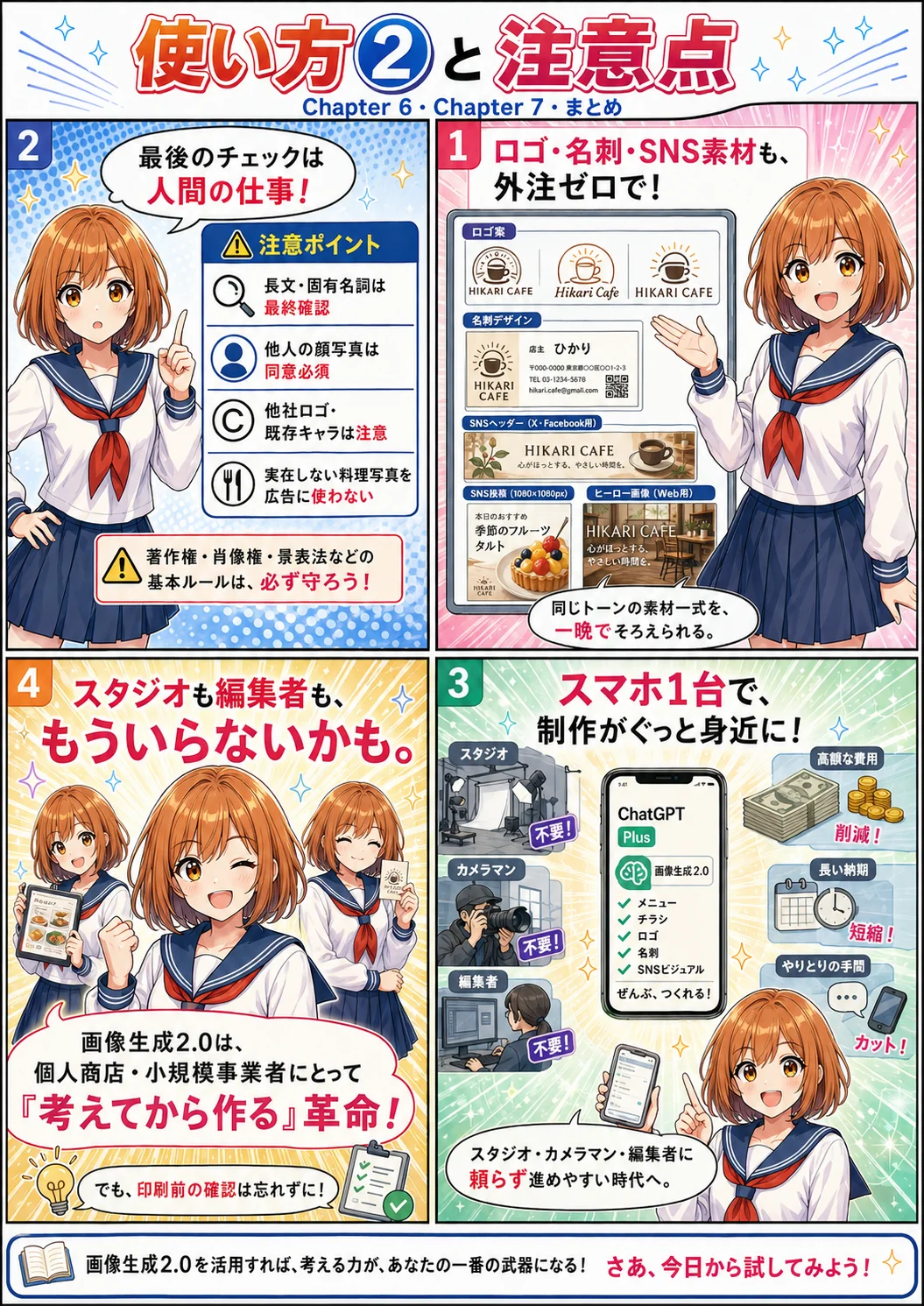
"Starting a business? First, get a logo and business cards," they used to say. And that meant either outsourcing it or wrestling with Illustrator yourself. Now you just talk to Chappy, and it's all there.
A full set of branding assets, done overnight
Describe your business name, concept, and the vibe you like: "give me 5 logo concepts." Pick your favorite, then say "now make the business card, social header, and landing-page hero to match." A complete, tonally consistent asset set — finished the same day.
For social media: the Instagram square, the vertical Stories format, the wide X banner — the same design in every aspect ratio, generated in one go. "Four banners for today's campaign" — daily production is finally realistic.
Even compositing — placing logos and text cleanly onto photos — works, because Thinking Mode reasons about placement and consistency. Work that used to demand Photoshop and design-software skills is turning into something you simply ask for in words.
Amazingly handy — but the final check is still on you.
Chappy's Image Gen 2.0 has gotten seriously smart. Even so, the final review remains a human job.
Don't leave it all to the AI — proofread the final output with your own eyes
⚠️ Final text check: Text rendering has improved dramatically, but long passages, proper nouns, and phone numbers still need a visual check before printing. Sometimes a single wrong character is fatal.
⚠️ People in your photos: Feeding in photos with other people in them and editing them raises portrait-rights and privacy issues. Never use customers' or staff members' faces without their consent.
⚠️ Trademarks and logos: Having it reproduce other companies' logos, characters, or famous product designs can run into trademark and copyright problems. Safest to stick to your own brand and assets.
⚠️ Don't pass off "food photos of dishes that don't exist" as real: Creating a photo of something you don't actually serve and using it in advertising can violate consumer-protection law (in Japan, the Premiums and Representations Act's misleading-quality rules). Use generated images as concept art or drafts, and swap in real photography for the final version.
Studios, photographers, editors — maybe we don't need them anymore.
Until now, "making a proper menu" meant renting a studio, hiring a photographer, commissioning a designer, meeting with an editor — and watching the equivalent of thousands of dollars in time and money evaporate.
Now, with just a smartphone and Chappy's (ChatGPT Plus) monthly subscription, an AI that "thinks before it draws" finishes your menus, flyers, logos, business cards, and social assets. Freedom from vendors, production costs of zero. It's no exaggeration to call this a revolution for small shops.
Of course, there's still a flavor only true professionals can deliver. But communications that used to be compromised for lack of budget and time can now hold their own, looking properly made — and the meaning of that change will seep into the look of our streets, little by little, over the years ahead.