Googling and skimming ten tabs — you might not need that anymore.
From opening search result links and comparing them one by one, to AI that searches across the web and hands you a summary with sources. From "Googling" to "Papu-ing."
"Searching" vs. "Papu-ing" — What's the Difference?
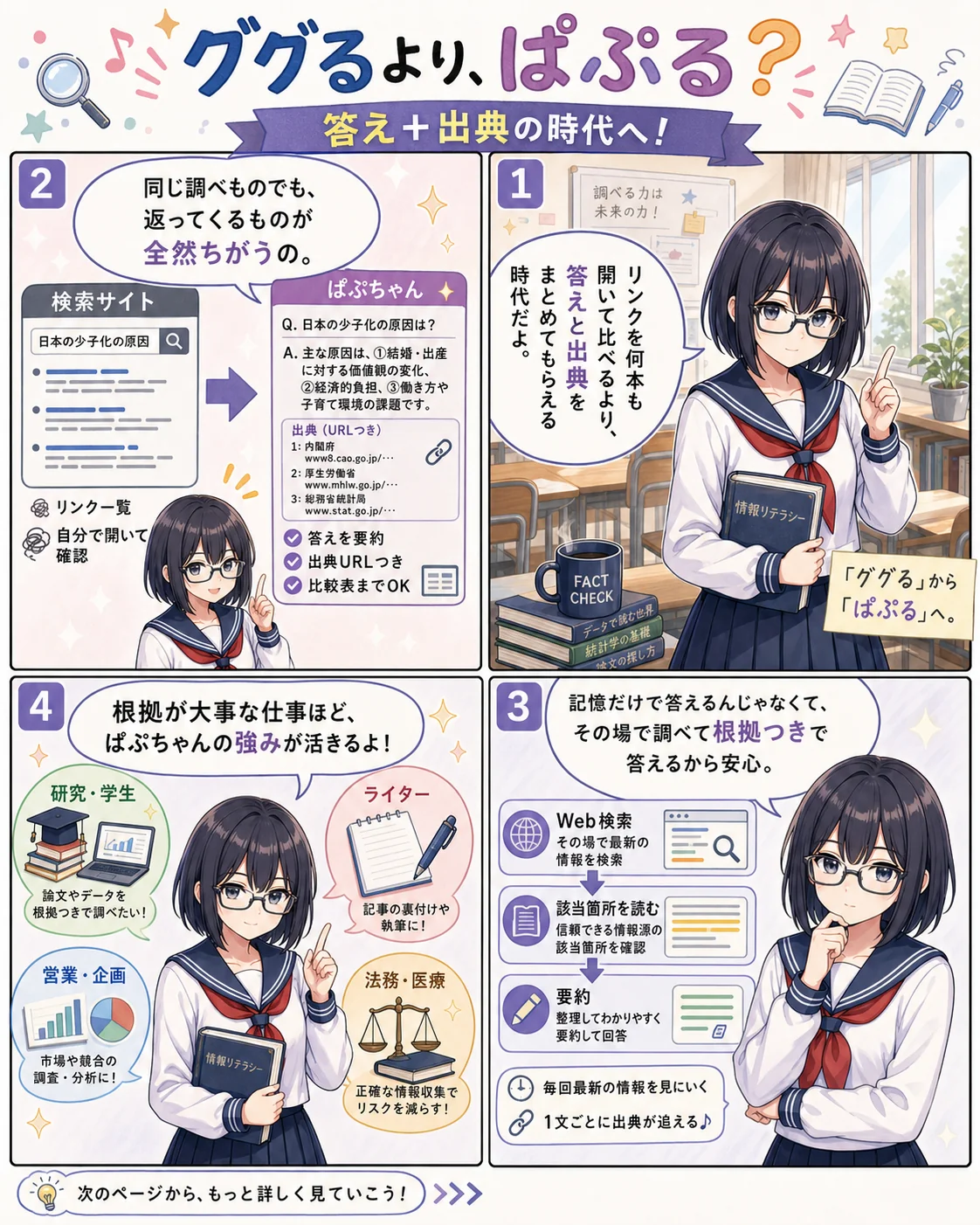
It's the same "looking something up," but what comes back is completely different. A regular search engine returns a list of related links; Papu-chan returns an answer with sources.
🔗 Returns a list of links
- You get a page of links related to your keywords
- You open and compare them yourself to find what's true
- Old and new articles come mixed together
- Sorting and summarizing is still 100% your job
📑 Returns answers with sources
- Answers your question by searching across the web
- Every single sentence comes with a source URL
- Prioritizes the latest primary sources
- Delivers ready-to-use summaries and comparison tables
Get the Gist in Manga Form
"So Papu-chan, what's actually so great about you?" Not big on long reads? Start with the manga version.
Why Hallucinations Rarely Happen
Lots of people worry that "AI makes stuff up" — but that's regular chat AIs. Papu-chan is different by design.

Papu-chan
A regular chat AI builds answers from "knowledge memorized at training time," so outdated info and plausible-sounding fabrications can slip in. Papu-chan instead builds every answer in three steps: search the web → read the relevant passages → summarize. That's her core design. Since each answer is assembled from the latest primary sources, hallucinations rarely happen.
She answers from a live web search, not memory — so she's strong on "today's info": news, stock prices, new product releases.
Every answer is backed by cited web URLs by design. If a sentence looks fishy, jump to the original source and verify it with your own eyes.
Narrow the sources: Academic mode searches papers only, Social mode searches social posts only. You control the quality of your information.
For writing answers she switches internally between top-tier models like GPT-5, Claude Opus, and Gemini 3 Pro. Great searching AND great writing, in one.
Especially Great If You Need Accurate Information
Papu-chan shines brightest in work where "the evidence behind the answer" matters. She turns your daily lookups into work that comes with citations.
Researchers & Students
Gather material for papers and conference talks, filtered to peer-reviewed papers only with Academic mode. Cited URLs double as reference-list candidates.
Sales & Consultants
Summarize a client's latest news, earnings, personnel moves, and hot topics in one minute before a meeting. You'll always have one "I saw your recent announcement…" ready to go.
Writers & Editors
Fact-check before you write. Verify numbers, dates, and proper nouns against the originals on the spot — no more getting grilled at the editorial meeting.
Execs, Planners & Marketers
Grasp market size, competitor moves, and emerging players in one pass. It all comes with sources, so it can go straight into internal meeting decks.
Legal & Medical Professionals
Check the latest laws, court decisions, and guidelines. Original-source links always come attached, so it's ready for professional use as-is.
Reporters & Analysts
Follow breaking news while gathering background at the same time. Lay out the "when, where, and who" — with sources attached.
The Ultimate Combo: Deep Research × NotebookLM
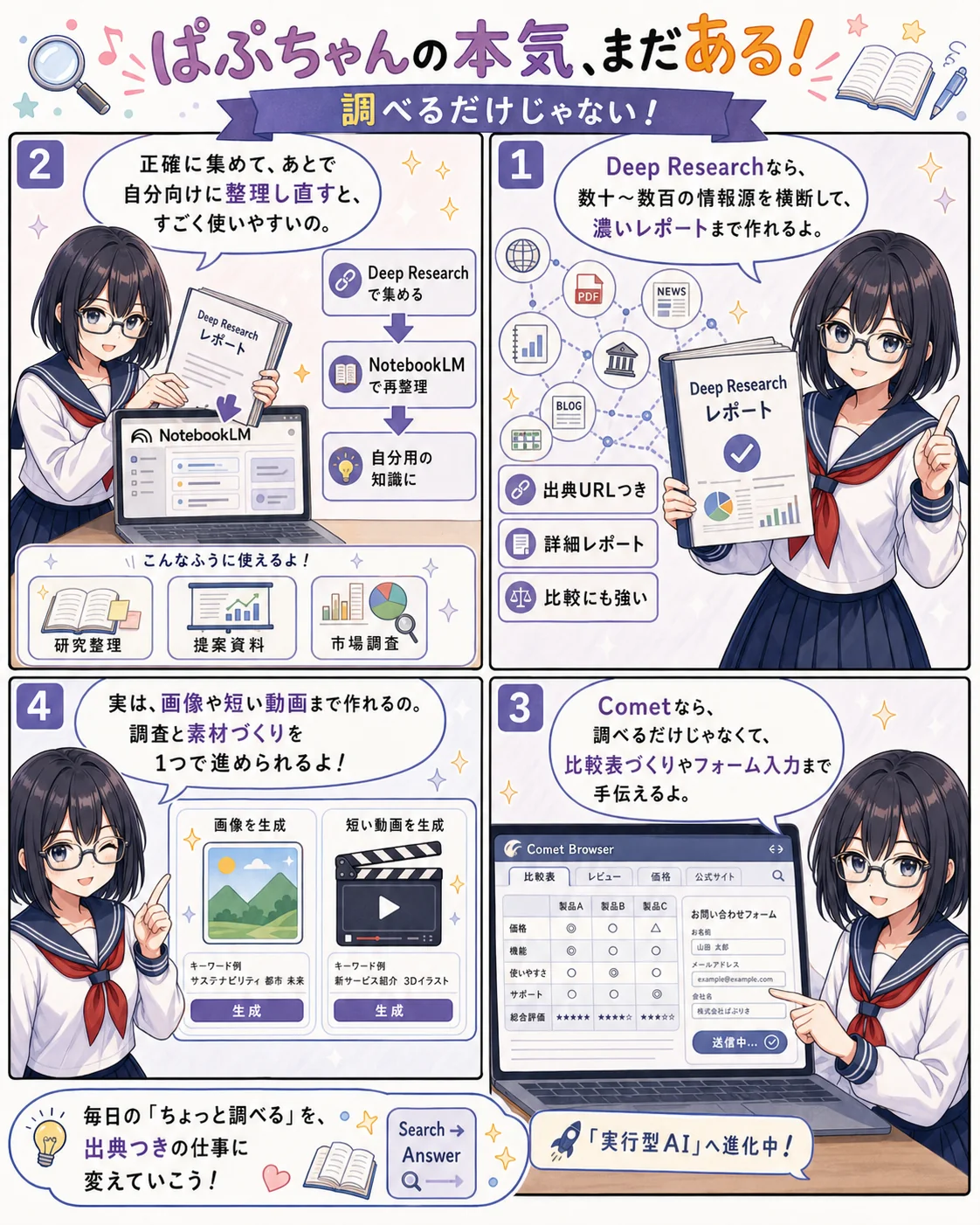
Papu-chan's true trump card is, without question, Deep Research — a serious mode that sweeps dozens to hundreds of sources and produces a massive amount of detailed, accurate data in one go. And when you hand that to Gemi-chan (Gemini)'s other face, NotebookLM, it transforms into output on a whole different level.
"Gathering it accurately" is Papu-chan's job; "making it your own" is Gemi-chan's.
Papu-chan's Deep Research is a phenomenal weapon: it generates evidence-backed reports fit for work and research in a single shot. The catch: the reports are so information-dense they run long. So feed them into Gemi-chan's NotebookLM as source material — have it answer your own questions, restructure the chapters, rebuild the summary — the "document-organizing AI" side of Gemi-chan (same Google family) pairs really, really well with Papu-chan.
Papu-chanPerplexity
Generate a report with Deep Research
Just hand her a topic and she sweeps dozens to hundreds of web sources into a detailed, accurate report — source URLs included.
 Gemi-chanGemini (NotebookLM)
Feed it to Gemi-chan to restructure
Pass the report as a source document to NotebookLM, Gemi-chan's other form. Add related materials and you can question, summarize, and outline across multiple sources.
Your own personal knowledge base
Sourced primary information, restructured around your questions and your context. Ready to drop into proposals, research notes, and internal knowledge bases.
Research & Paper Prep
Deep Research on papers only via Academic mode → then cross-question them alongside related papers in Gemi-chan (NotebookLM). Literature reviews get so much easier.
Industry & Market Research
Feed an industry Deep Research report plus your own company docs into Gemi-chan at the same time — and turn it into "what this means for us."
Proposal Groundwork
Deep Research the client company → hand it to Gemi-chan to outline along your proposal's storyline. The slide structure practically writes itself.
Audio Summaries
Use Gemi-chan (NotebookLM)'s Audio Overview (a two-host, podcast-style recap) to review your Deep Research report by ear during your commute.
She's Also Going Agentic
The Papu-chan who "just returns answers"? Old news. With Comet, the AI browser that launched in 2025, she now roams the web and does the work herself. Not many people know about it, but it's seriously handy.
Inside the browser, Papu-chan does the work herself
Comet is Perplexity's browser with AI built in. It looks just like regular Chrome, but talk to the sidebar and it gathers information across tabs, fills in forms, even builds price-comparison tables — all on its own.
For example: "Compare these 5 companies' latest news in a table," "Compare this product's price across 3 shopping sites, cheapest first," "Draft this job application form from my profile" — one instruction, the browser runs on its own, and only the result comes back.
Since it carries research all the way through to reports and actual task execution, it stands alongside ChatGPT Agent and Claude's Computer Use as one of the "execution-type AIs" — and it's already creating a real edge in research-heavy work.
She Can Make Images and Videos Too
The "Papu-chan = search only" image is way too strong. There's no flashy menu item for it, but she actually supports image and video generation too.
Research results + visuals, all from one girl
Add "generate an image" to your prompt, or pick a model in the settings, and she'll create an image and drop it right in after the research results. Short video clips work much the same way.
"Summarize the market landscape, then make me a hero image to match" — having research and asset creation finished inside one AI is genuinely convenient. Janiko (Midjourney) and Chappy's image generation still win in some scenarios, but for "a figure to paste into a deck," she's plenty.
The UI deliberately keeps it low-key, so it's a perk for those in the know. Using her "only for search" might be leaving value on the table.
Turn your daily "quick lookups" into work with citations.
The "Google it" habit is twenty years old now. But the shortcut to better work is swapping that entry point for "Papu it." Fresh primary sources, answers with citations, even browser automation when you need it — time to rewrite the common sense of looking things up, together with Papu-chan.